
Java - Mybatis配置-XML 映射器
XML 映射器
MyBatis 的真正强大在于它的语句映射,这是它的魔力所在。由于它的异常强大,映射器的 XML 文件就显得相对简单。如果拿它跟具有相同功能的 JDBC 代码进行对比,你会立即发现省掉了将近 95% 的代码。MyBatis 致力于减少使用成本,让用户能更专注于 SQL 代码。
1. 基本结构
SQL 映射文件只有很少的几个顶级元素(按照应被定义的顺序列出):
- cache – 该命名空间的缓存配置。
- cache-ref – 引用其它命名空间的缓存配置。
- resultMap – 描述如何从数据库结果集中加载对象,是最复杂也是最强大的元素。
- sql – 可被其它语句引用的可重用语句块。
- insert – 映射插入语句。
- update – 映射更新语句。
- delete – 映射删除语句。
- select – 映射查询语句。
因为增删改查已经使用过,所以不再记录
2. resultMap
resultMap 元素是 MyBatis 中最重要最强大的元素。它可以让你从 90% 的 JDBC ResultSets 数据提取代码中解放出来,并在一些情形下允许你进行一些 JDBC 不支持的操作。实际上,在为一些比如连接的复杂语句编写映射代码的时候,一份 resultMap 能够代替实现同等功能的数千行代码。ResultMap 的设计思想是,对简单的语句做到零配置,对于复杂一点的语句,只需要描述语句之间的关系就行了。
resultMap -- > 结果映射
- 结果: SQL语句执行的结果
- 映射: SQL语句执行的结果与JAVA实体类之间的映射
- 自动映射:查询结果会自动映射,但前提是数据库字段列名和实体类的属性名要一致
既然映射器会自动映射,那设立resultMap有什么用呢?
这个时候就需要用到上一节的知识,如果我们没有在配置文件中设置驼峰命名规则,在数据库中的字段为create_time,而我们编写的实体类的属性为createTime,或者在编写SQL语句的时候,为列名使用了别名,那怎么办呢?这个时候,字段名和属性名都不一致,肯定是没办法自动映射的,所以我们需要使用resultMap来进行指定映射。
例如正常自动封装的SQL语句:
    <select id="findBookInfoById" resultType="BookInfo">
        select id uid,name uname,author,`desc`,price from bookinfo where id = #{id}
    </select>
正常输出,自动映射是没有问题的
DEBUG [main] - ==>  Preparing: select id,name,author,`desc`,price from bookinfo where id = ?
DEBUG [main] - ==> Parameters: 1(Integer)
DEBUG [main] - <==      Total: 1
BookInfo(id=1, name=道听途说, author=何金银, desc=都市异闻、悬疑灵异、神秘文化、中式恐怖……15个让你忘记呼吸的精彩故事。惊喜收录神秘篇章《爱你,林西》。亲眼所见,未必真实。道听途说,未必虚假。, price=29.7)
那接下来,我们为列名指定别名,在运行呢?
    <select id="findBookInfoById" resultType="BookInfo">
        select id uid,name uname,author,`desc`,price from bookinfo where id = #{id}
    </select>
修改别名后输出
DEBUG [main] - ==>  Preparing: select id uid,name uname,author,`desc`,price from bookinfo where id = ?
DEBUG [main] - ==> Parameters: 1(Integer)
DEBUG [main] - <==      Total: 1
BookInfo(id=null, name=null, author=何金银, desc=都市异闻、悬疑灵异、神秘文化、中式恐怖……15个让你忘记呼吸的精彩故事。惊喜收录神秘篇章《爱你,林西》。亲眼所见,未必真实。道听途说,未必虚假。, price=29.7)
发现修改别名的字段id和name没有自动映射,是null,那针对这种情况,就需要我们使用resultMap来进行指定映射。
修改映射文件,进行手动映射
<!--    开始手动映射,列名和属性名一一对应-->
    <resultMap id="bookResultType" type="BookInfo">
    <!-- id标签,用来映射主键列 -->
        <id property="id" column="uid"/>
        <!-- 其他列,使用result标签进行映射 -->
        <result property="name" column="uname"/>
        <!-- 其他列名和属性一致,可以省略不写,会自动映射 -->
        <!-- <result property="author" column="author"/>
        <result property="desc" column="desc"/>
        <result property="price" column="price"/> -->
    </resultMap>

<!--    不再是用自动映射,就不再需要resultType属性,而是使用resultMap-->
    <select id="findBookInfoById" resultMap="bookResultType">
        select id uid,name uname,author,`desc`,price from bookinfo where id = #{id}
    </select>
这时我们再进行测试输出
DEBUG [main] - ==>  Preparing: select id uid,name uname,author,`desc`,price from bookinfo where id = ?
DEBUG [main] - ==> Parameters: 1(Integer)
DEBUG [main] - <==      Total: 1
BookInfo(id=1, name=道听途说, author=何金银, desc=都市异闻、悬疑灵异、神秘文化、中式恐怖……15个让你忘记呼吸的精彩故事。惊喜收录神秘篇章《爱你,林西》。亲眼所见,未必真实。道听途说,未必虚假。, price=29.7)
3. 多表联查
多表联查是 MyBatis 中最常见的操作之一。MyBatis 允许你通过一条 SQL 语句来查询多个表的数据。这在实际应用中非常有用,因为有些时候我们需要从多个表中查询数据,而这些表之间存在着复杂的关系。
表关系有三种常见的形式:一对一、一对多、多对多。
例如,一个订单表和一个用户表,一个订单只能对应一个用户,一个用户可以有多订单。
3.1 一对一
一对一关系是最简单的关系。接下来通过案例来学习一对一关系的映射。
需求: 实现一对一查询,查询订单信息及其对应的用户信息
数据表:order表和user表
实现接收多表联查返回的方式有很多种,可以封装一个VO类,用来存放多表联查的数据,这里我选择在Order实体类中存放User user属性
- 编写Order实体类
package org.example.model;

import lombok.Data;
import java.sql.Date;

@Data
public class Order {
    private Integer orderId;
    private Integer userId;
    private String desc;
    private Date createTime;
    private Date updateTime;
    private User user;
}
- 编写mapper接口中的查询方法
package org.example.mapper;

import org.example.model.Order;

public interface OrderMapper {

//    查询指定的订单信息
    Order getOrderById(int orderId);
}
- 在映射文件中编写SQL语句,通过
resultMap进行映射
<!-- 定义一个结果映射,用于将查询结果映射到 Order 对象及其关联的 User 对象 -->
<resultMap id="orderWithUser" type="Order">
    <!-- id 标签用于映射主键字段 -->
    <id property="orderId" column="orderId"/>
    <!-- result 标签用于映射普通字段 -->
    <result property="desc" column="desc"/>
    <result property="userId" column="userId"/>
    <result property="createTime" column="create_time"/>
    <result property="updateTime" column="update_time"/>

    <!-- association 标签用于映射关联对象,这里将 User 对象映射到 Order 对象的 user 属性 -->
    <association property="user" javaType="User">
        <!-- id 标签用于映射 User 对象的主键字段 -->
        <id property="id" column="id"/>
        <!-- result 标签用于映射 User 对象的普通字段 -->
        <result property="name" column="name"/>
        <result property="sex" column="sex"/>
        <result property="phone" column="phone"/>
        <result property="address" column="address"/>
        <result property="email" column="email"/>
        <result property="createTime" column="userCreateTime"/>
        <result property="updateTime" column="userUpdateTime"/>
    </association>
</resultMap>

<!-- 定义一个查询语句,用于根据订单ID查询订单及其关联的用户信息 -->
<select id="getOrderById" resultMap="orderWithUser">
    <!-- 查询语句,选择 order 表和 user 表的所有字段,并对 user 表的 create_time 和 update_time 字段重命名 -->
    select distinct o.*, u.*, u.create_time as userCreateTime, u.update_time as userUpdateTime
    from `order` o
    <!-- 内连接 user 表,条件是 user 表的 id 字段等于 order 表的 userId 字段 -->
    inner join `user` u
    on u.id = o.userId
    <!-- 查询条件,根据 orderId 进行过滤 -->
    where orderId = 1
</select>
详细解释
<resultMap>标签:
用于定义结果映射,将查询结果映射到 Java 对象。
id 属性:唯一标识这个结果映射。
type 属性:指定目标 Java 对象的类型,这里是 Order。<id>标签:
用于映射主键字段。
property 属性:指定 Java 对象中的属性名。
column 属性:指定数据库表中的列名。<result>标签:
用于映射普通字段。
property 属性:指定 Java 对象中的属性名。
column 属性:指定数据库表中的列名。<association>标签:
用于映射关联对象。
property 属性:指定 Java 对象中的关联属性名,这里是 user。
javaType 属性:指定关联对象的类型,这里是 User。
可以看到,在xml文件中,我们定义了一个resultMap,进行一对一查询,用于多表联查,通过resultMap标签进行映射,并通过association标签进行关联对象映射。
tip:需要注意的是,order表中和user表中都拥有create_time和update_time字段,为了区分,我使用了别名,字段名 as 别名的方式进行重命名。也就是在语句中,使用了u.create_time as userCreateTime, u.update_time as userUpdateTime,其中as可以省略不写。这样就解决了字段冲突的问题
- 输出测试
DEBUG [main] - ==>  Preparing: select distinct o.*, u.*, u.create_time as userCreateTime, u.update_time as userUpdateTime from `order` o inner join `user` u on u.id = o.userId where orderId = 1
DEBUG [main] - ==> Parameters:
DEBUG [main] - <==      Total: 1
Order(orderId=1, userId=1, desc=购买了《道听途说》, createTime=2024-10-22, updateTime=2024-10-29, user=User(id=1, name=张三, sex=男, phone=13265448124, address=山西省太原市迎泽区, email=13265448124@163.com, createTime=2024-10-19, updateTime=null))
可以看到,日志输出了我们编写的SQL语句,也正常输出了查询后的结果
3.2 一对多
需求: 实现一对多查询,查询用户信息及其关联的订单信息
数据表: order 表和 user 表
同上面一对一的查询一样,选择在User实体类中存放List<Order> orders属性,然后编写SQL语句,通过resultMap进行映射
- 编写User实体类
package org.example.model;

import lombok.Data;

import java.sql.Date;
import java.util.List;

@Data
public class User {
    private Integer id;
    private String name;
    private String sex;
    private String phone;
    private String address;
    private String email;
    private Date createTime;
    private Date updateTime;
    private List<Order> orderList;
}
- 编写mapper接口中的查询方法
package org.example.mapper;

import org.example.model.User;

public interface UserMapper {

    //查询用户及其关联的所有订单
    public User selectUserInfo(int id);
}
- 在映射文件中编写SQL语句,通过
resultMap进行映射
    <resultMap id="selectUserWithOrders" type="User">
        <id property="id" column="id"/>
        <result property="name" column="name"/>
        <result property="sex" column="sex"/>
        <result property="phone" column="phone"/>
        <result property="address" column="address"/>
        <result property="email" column="email"/>
        <result property="createTime" column="create_time"/>
        <result property="updateTime" column="update_time"/>
        <!-- 因为存储的是List<order>,所以这里使用collection标签进行映射 并且不使用javaType指明类型,而使用ofType属性指明集合中存储的类型 -->
        <collection property="orderList" ofType="Order">
            <id property="orderId" column="orderId"/>
            <result property="desc" column="desc"/>
            <result property="userId" column="userId"/>
            <result property="createTime" column="orderTime"/>
            <result property="updateTime" column="orderUpdateTime"/>
        </collection>
    </resultMap>
    <select id="selectUserInfo" resultMap="selectUserWithOrders">
        select u.*,o.*,o.create_time as orderTime,o.update_time as orderUpdateTime from `user`u
        inner join `order` o
        on u.id = o.userId
        where id = 1
    </select>
- 输出测试
DEBUG [main] - ==>  Preparing: select u.*,o.*,o.create_time as orderTime,o.update_time as orderUpdateTime from `user`u inner join `order` o on u.id = o.userId where id = 1
DEBUG [main] - ==> Parameters:
DEBUG [main] - <==      Total: 2
User(id=1, name=张三, sex=男, phone=13265448124, address=山西省太原市迎泽区, email=13265448124@163.com, createTime=2024-10-19, updateTime=null, orderList=[Order(orderId=1, userId=1, desc=购买了《道听途说》, createTime=2024-10-22, updateTime=2024-10-29, user=null), Order(orderId=2, userId=1, desc=购买了《一本关于我们的书》, createTime=2024-10-21, updateTime=2024-10-29, user=null)])
可以看到,日志输出了我们编写的SQL语句,也正常输出了查询后的结果
tip:我们发现,采用直接在实体类中增加属性的方式,实现了一对一,一对多的映射,但是查询出来的数据,总会有多余的null值,这时我们可以使用VO类作为实体类的扩展类,来解决这个问题。
如下:
- 编写OrderVO类
package org.example.VO;

import lombok.Data;
import org.example.model.Order;
import org.example.model.User;

@Data
public class OrderVO extends Order {
    private User user;

    @Override
    public String toString() {
        String str = super.toString();
        return str + ",OrderVO{" +
                "user=" + user +
                "}";
    }
}
- 编写UserVO类
package org.example.VO;

import lombok.Data;
import org.example.model.Order;
import org.example.model.User;

import java.util.List;

@Data
public class UserVO extends User {
    private List<Order> orderList;

    @Override
    public String toString() {
        String str = super.toString();
        return str + ",UserVO{" +
                "orderList=" + orderList +
                "}";
    }
}
- 修改mapper接口的返回值为对应的VO扩展类
OrderMapper.java
OrderVO getOrderById(int orderId);
UserMapper.java
UserVO selectUserInfo(int id);
- 修改xml文件中的resultMap,将查询结果映射到VO类
OrderMapper.xml
    <resultMap id="orderWithUser" type="org.example.VO.OrderVO">
        <!-- ...省略其他代码 -->
    </resultMap>
UserMapper.xml
    <resultMap id="selectUserWithOrders" type="org.example.VO.UserVO">
        <!-- ...省略其他代码 -->
    </resultMap>
- 输出测试
User(id=1, name=张三, sex=男, phone=13265448124, address=山西省太原市迎泽区, email=13265448124@163.com, createTime=2024-10-19, updateTime=null){UserVO{orderList=[Order(orderId=1, userId=1, desc=购买了《道听途说》, createTime=2024-10-22, updateTime=2024-10-29), Order(orderId=2, userId=1, desc=购买了《一本关于我们的书》, createTime=2024-10-21, updateTime=2024-10-29)]}}
可以看到,这样子编写,就能实现一对一,一对多的查询,并且解决了null值的问题
4. 动态SQL
动态 SQL 是 MyBatis 的强大特性之一。如果你使用过 JDBC 或其它类似的框架,你应该能理解根据不同条件拼接 SQL 语句有多痛苦,例如拼接时要确保不能忘记添加必要的空格,还要注意去掉列表最后一个列名的逗号。利用动态 SQL,可以彻底摆脱这种痛苦。使用动态 SQL 并非一件易事,但借助可用于任何 SQL 映射语句中的强大的动态 SQL 语言,MyBatis 显著地提升了这一特性的易用性。如果你之前用过 JSTL 或任何基于类 XML 语言的文本处理器,你对动态 SQL 元素可能会感觉似曾相识。在 MyBatis 之前的版本中,需要花时间了解大量的元素。借助功能强大的基于 OGNL 的表达式,MyBatis 3 替换了之前的大部分元素,大大精简了元素种类,现在要学习的元素种类比原来的一半还要少。
常见的动态SQL语法有:
- if 标签
- trim 标签
- foreach 标签
- where 标签
- set 标签
- SQL 片段
4.1 SQL 片段
用来定义可重用的 SQL 代码片段,以便在其它语句中使用。参数可以静态地(在加载的时候)确定下来,并且可以在不同的 include 元素中定义不同的参数值。
SQL 片段,主要是为了解决代码重复编写的问题,将重复的SQL语句提取出来,然后在不同的地方引用,提高代码的复用性。可以在这里查看详细的官方文档
比如,现在我们使用的BookMapper.xml映射文件中,有很多查询方法
    <select id="findAllBookInfo" resultType="BookInfo">
        select * from bookinfo
    </select>

    <select id="findBookInfo" resultType="BookInfo">
        select * from bookinfo where name like concat('%',#{name},'%')
        and author like concat('%',#{author},'%')
    </select>
    <select id="findBookInfoByObject" resultType="BookInfo">
        select * from bookinfo where name like concat('%',#{name},'%')
                                 and author like concat('%',#{author},'%')
    </select>
    <select id="findBookInfoByMap" resultType="BookInfo">
        select * from bookinfo where name like concat('%',#{nameKey},'%')
                                 and author like concat('%',#{authorKey},'%')
    </select>
我们可以看到,这些查询方法,都是select * from bookinfo语句的开头,只是后面条件语句不同而已,这个时候,我们就可以将select * from bookinfo语句提取出来,然后在不同的地方引用,提高代码的复用性。
- 将重复的语句提取出来,使用
标签定义, id属性定义SQL的唯一标识符,然后在需要引用的地方使用 标签引用。
    <sql id="bookInfoSql">
        select  * from bookinfo
    </sql>
- 在需要引用的地方使用
标签引用
    <select id="findAllBookInfo" resultType="BookInfo">
        <include refid="bookInfoSql"/>
    </select>

    <select id="findBookInfo" resultType="BookInfo">
        <include refid="bookInfoSql"/>
        where name like concat('%',#{name},'%')
        and author like concat('%',#{author},'%')
    </select>

    <select id="findBookInfoByObject" resultType="BookInfo">
        <include refid="bookInfoSql"/>
        where name like concat('%',#{name},'%')
        and author like concat('%',#{author},'%')
    </select>

    <select id="findBookInfoByMap" resultType="BookInfo">
        <include refid="bookInfoSql"/>
        where name like concat('%',#{nameKey},'%')
        and author like concat('%',#{authorKey},'%')
    </select>
- 输出测试
DEBUG [main] - ==>  Preparing: select * from bookinfo where name like concat('%',?,'%') and author like concat('%',?,'%')
DEBUG [main] - ==> Parameters: 途说(String), (String)
DEBUG [main] - <==      Total: 1
[BookInfo(id=1, name=道听途说, author=何金银, desc=都市异闻、悬疑灵异、神秘文化、中式恐怖……15个让你忘记呼吸的精彩故事。惊喜收录神秘篇章《爱你,林西》。亲眼所见,未必真实。道听途说,未必虚假。, price=29.7)]
可以发现,正常输出了查询结果,SQL语句也是没有问题的,在案例中代码较短,所以方便之处看不出来,但在实际应用中,代码量可能会很大,提取SQL语句,可以大大提高代码的复用性,提高开发效率。
4.2 if where 标签
where 标签 用来拼接条件语句。if 标签,主要用来判断条件是否成立,拼接条件语句。这两个经常搭配使用。
比如,我们数据库中现在存放的有图书名,作者,价格,简略介绍等,我们可以通过图书名查找,那我们在xml映射文件中,就可以使用where 和 if标签来完成。
之前已经写过,所以这里这给出xml代码
    <select id="findBookInfoByObject" resultType="BookInfo">
        <!-- 使用上面的SQL片段 -->
        <include refid="bookInfoSql" />
        <where>
            <if test="name != null">
            `name` like concat('%',#{name},'%')
            </if>
        </where>
    </select>
这个时候,如果书名不为空,就会拼接条件语句,这样子,就可以根据书名是否为空,来完成图书名查找。
4.3 Set 标签
用于动态更新语句,set 元素可以用于动态包含需要更新的列,忽略其它不更新的列。会动态的插入SET关键字,并删除多余的
逗号
其实在最开始,编写更新图书的例子中,就已经使用到了Set和if标签,这里再次给出xml代码
    <update id="updateBookInfo" parameterType="BookInfo">
        <!-- 更新语句的ID,用于在Mapper接口中调用 -->
        <!-- parameterType 指定了传入参数的类型,这里是 bookInfo -->

        update bookinfo
        <!-- 更新的表名 -->

        <set>
            <!-- <set> 标签用于动态生成 SQL 的 SET 子句,会自动去除多余的逗号 -->

            <if test="name != null">
                <!-- <if> 标签用于条件判断,test 属性中的表达式为 true 时,才会将里面的 SQL 片段包含到最终生成的 SQL 语句中 -->
                name = #{name},
                <!-- 如果 name 不为空,则生成 name = #{name}, 这里的 #{name} 是 MyBatis 的占位符,表示从传入的 bookInfo 对象中获取 name 属性的值 -->
            </if>

            <if test="author != null">
                author = #{author},
                <!-- 如果 author 不为空,则生成 author = #{author}, 这里的 #{author} 是 MyBatis 的占位符,表示从传入的 bookInfo 对象中获取 author 属性的值 -->
            </if>

            <if test="desc != null">
                `desc` = #{desc},
                <!-- 如果 desc 不为空,则生成 `desc` = #{desc}, 这里的 `desc` 用反引号包围,因为 desc 是 MySQL 的保留关键字,需要特殊处理 -->
            </if>

            <if test="price != null">
                price = #{price},
                <!-- 如果 price 不为空,则生成 price = #{price}, 这里的 #{price} 是 MyBatis 的占位符,表示从传入的 bookInfo 对象中获取 price 属性的值 -->
            </if>
        </set>

        where id = #{id}
        <!-- where 子句,用于指定更新的条件,这里的 #{id} 是 MyBatis 的占位符,表示从传入的 bookInfo 对象中获取 id 属性的值 -->
    </update>
然后我们再进行测试
    @Test
    public void testUpdateBookInfo(){
        SqlSession session = null;
        try {
            // 获取SqlSession对象
            session = MyBatisUtil.getSqlSession();

            BookInfoMapper mapper = session.getMapper(BookInfoMapper.class);
            BookInfo bookInfo = new BookInfo();
            bookInfo.setId(9);
            bookInfo.setDesc("祭拜星空,生者和死者都将在那里汇聚,浩然而成万古消息");
            System.out.println(mapper.updateBookInfo(bookInfo) > 0);
//            session.commit();
        } finally {
            // 关闭SqlSession对象,释放资源
            MyBatisUtil.closeSqlSession(session);
        }
    }
观察输出
DEBUG [main] - ==>  Preparing: update bookinfo SET `desc` = ? where id = ?
DEBUG [main] - ==> Parameters: 祭拜星空,生者和死者都将在那里汇聚,浩然而成万古消息(String), 9(Integer)
DEBUG [main] - <==    Updates: 1
true
可以看到日志打印的SQL语句,因为我们在测试方法中,设置了要修改的数据id为9,修改desc字段为"祭拜星空,生者和死者都将在那里汇聚,浩然而成万古消息",然后执行了更新操作,SQL语句中,也正确输出了SET子句,并且删除了多余的逗号。
4.4 foreach 标签
动态 SQL 的另一个常见使用场景是对集合进行遍历(尤其是在构建 IN 条件语句的时候)。
使用场景,批量查询,修改,删除,我们传入一个集合参数,就需要使用foreach标签来遍历集合,动态的拼接SQL语句
这里仅在批量查询中做演示
- mapper接口编写批量查询方法
List<BookInfo> getBookInfoByIds(List<Integer> ids);
- 编写xml文件,使用foreach标签遍历集合,拼接SQL语句
    <select id="getBookInfoByIds" resultType="BookInfo">
        <include refid="bookInfoSql"/>
        where id in
        <foreach collection="list" item = "id" open="(" separator="," close=")">
        #{id}
        </foreach>
    </select>
- 测试类编写测试代码,传入一个集合参数
    @Test
    public void testBookInfoByIds(){
        SqlSession session = null;
        try {
            // 获取SqlSession对象
            session = MyBatisUtil.getSqlSession();

            BookInfoMapper mapper = session.getMapper(BookInfoMapper.class);
            List<Integer> ids = new ArrayList<Integer>();
            Collections.addAll(ids,1,2,3,4,7);
            System.out.println(mapper.getBookInfoByIds(ids));

        } finally {
            // 关闭SqlSession对象,释放资源
            MyBatisUtil.closeSqlSession(session);
        }
    }
输出
DEBUG [main] - ==>  Preparing: select * from bookinfo where id in ( ? , ? , ? , ? , ? )
DEBUG [main] - ==> Parameters: 1(Integer), 2(Integer), 3(Integer), 4(Integer), 7(Integer)
DEBUG [main] - <==      Total: 5
[BookInfo(id=1, name=道听途说, author=何金银, desc=都市异闻、悬疑灵异、神秘文化、中式恐怖……15个让你忘记呼吸的精彩故事。惊喜收录神秘篇章《爱你,林西》。亲眼所见,未必真实。道听途说,未必虚假。, price=29.7), BookInfo(id=2, name=第十三位陪审员, author=史蒂夫·卡瓦纳, desc=金BI首奖得主史蒂夫卡瓦纳法庭推理神作。如果无法击败主宰者,那就成为他。连环谋杀,一场与时间博弈的竞赛,杀人只是游戏的开端。, price=21.6), BookInfo(id=3, name=一本关于我们的书, author=李晔, desc=精装全彩,有趣、有用、有心!感情升温神器,炙手可热的DIY创意礼物。世界那么大,很幸运我和你成为“我们”。手残党的福音,手艺人的乐园,跟着提示,一笔一画写成专属于你和TA的书。, price=32.8), BookInfo(id=4, name=自成人间, author=季羡林, desc=感动中国获奖人物,东方世界文学巨擘。白岩松、金庸、贾平凹、林青霞极力推崇。收录多篇入选语文教材、中高考阅读佳作,央视《朗读者》一读再读。恰似人间惊鸿客,只等秋风过耳边。, price=22.5), BookInfo(id=7, name=我与地坛, author=史铁生, desc=2024年百班千人寒假书单 九年级推荐阅读, price=17.5)]
可以看到,正确输出了我们传入的集合参数,并拼接成了SQL语句,使用foreach标签,可以方便的遍历集合,动态的拼接SQL语句。
这时候应该会有疑问,明明我们传入的集合参数名为ids,为什么xml文件中,foreach标签中的参数名用的却是list? 那我们不妨将参数名改为ids,然后再测试输出试试
测试输出:
org.apache.ibatis.exceptions.PersistenceException:
### Error querying database.  Cause: org.apache.ibatis.binding.BindingException: Parameter 'ids' not found. Available parameters are [arg0, collection, list]
### Cause: org.apache.ibatis.binding.BindingException: Parameter 'ids' not found. Available parameters are [arg0, collection, list]
报错信息中,提示我们传入的参数ids没有找到,根据报错信息可以看到,Available parameters are [arg0, collection, list],可用的参数有arg0,collection,list,所以在foreach标签中,参数名只能为arg0, collection, list中的一个。
5. 缓存
缓存的主要目的,就是为了提高查询效率,减少数据库的压力。
Mybatis提供了缓存机制,并分为一级缓存``和二级缓存。详细说明配置可以查看官方文档
5.1 一级缓存
一级缓存是mybatis默认开启的缓存机制,无需配置,自动实现。它的生命周期是请求作用域的,在一次请求中,会先从缓存中查找数据,如果没有,才会到数据库中查询。默认的一级缓存是基于
SqlSession级别的,也就是指同一个SqlSession对象发起的多次查询同一个语句, MyBatis会将结果缓存到就会使用缓存。
5.1.1 命中缓存
怎么查询我们到底有没有命中缓存呢?我们可以通过sql语句来确认, 只有发出了sql语句,就说明查询了数据库,没有使用到缓存。
就比如上面的foreach,我们查询两次看一下输出:
@Test
    public void testBookInfoByIds(){
        SqlSession session = null;
        try {
            // 获取SqlSession对象
            session = MyBatisUtil.getSqlSession();

            BookInfoMapper mapper = session.getMapper(BookInfoMapper.class);
            List<Integer> ids = new ArrayList<Integer>();
            Collections.addAll(ids,1,2,3,4,7);
//            命中缓存的前提,1). 同一sqlSession,2). 同一条件
            System.out.println(mapper.getBookInfoByIds(ids));
            System.out.println("======================================");
            System.out.println(mapper.getBookInfoByIds(ids));
        } finally {
            // 关闭SqlSession对象,释放资源
            MyBatisUtil.closeSqlSession(session);
        }
    }
测试输出
DEBUG [main] - ==>  Preparing: select * from bookinfo where id in ( ? , ? , ? , ? , ? )
DEBUG [main] - ==> Parameters: 1(Integer), 2(Integer), 3(Integer), 4(Integer), 7(Integer)
DEBUG [main] - <==      Total: 5
[BookInfo(id=1, name=道听途说, author=何金银, desc=都市异闻、悬疑灵异、神秘文化、中式恐怖……15个让你忘记呼吸的精彩故事。惊喜收录神秘篇章《爱你,林西》。亲眼所见,未必真实。道听途说,未必虚假。, price=29.7), BookInfo(id=2, name=第十三位陪审员, author=史蒂夫·卡瓦纳, desc=金BI首奖得主史蒂夫卡瓦纳法庭推理神作。如果无法击败主宰者,那就成为他。连环谋杀,一场与时间博弈的竞赛,杀人只是游戏的开端。, price=21.6), BookInfo(id=3, name=一本关于我们的书, author=李晔, desc=精装全彩,有趣、有用、有心!感情升温神器,炙手可热的DIY创意礼物。世界那么大,很幸运我和你成为“我们”。手残党的福音,手艺人的乐园,跟着提示,一笔一画写成专属于你和TA的书。, price=32.8), BookInfo(id=4, name=自成人间, author=季羡林, desc=感动中国获奖人物,东方世界文学巨擘。白岩松、金庸、贾平凹、林青霞极力推崇。收录多篇入选语文教材、中高考阅读佳作,央视《朗读者》一读再读。恰似人间惊鸿客,只等秋风过耳边。, price=22.5), BookInfo(id=7, name=我与地坛, author=史铁生, desc=2024年百班千人寒假书单 九年级推荐阅读, price=17.5)]
======================================
[BookInfo(id=1, name=道听途说, author=何金银, desc=都市异闻、悬疑灵异、神秘文化、中式恐怖……15个让你忘记呼吸的精彩故事。惊喜收录神秘篇章《爱你,林西》。亲眼所见,未必真实。道听途说,未必虚假。, price=29.7), BookInfo(id=2, name=第十三位陪审员, author=史蒂夫·卡瓦纳, desc=金BI首奖得主史蒂夫卡瓦纳法庭推理神作。如果无法击败主宰者,那就成为他。连环谋杀,一场与时间博弈的竞赛,杀人只是游戏的开端。, price=21.6), BookInfo(id=3, name=一本关于我们的书, author=李晔, desc=精装全彩,有趣、有用、有心!感情升温神器,炙手可热的DIY创意礼物。世界那么大,很幸运我和你成为“我们”。手残党的福音,手艺人的乐园,跟着提示,一笔一画写成专属于你和TA的书。, price=32.8), BookInfo(id=4, name=自成人间, author=季羡林, desc=感动中国获奖人物,东方世界文学巨擘。白岩松、金庸、贾平凹、林青霞极力推崇。收录多篇入选语文教材、中高考阅读佳作,央视《朗读者》一读再读。恰似人间惊鸿客,只等秋风过耳边。, price=22.5), BookInfo(id=7, name=我与地坛, author=史铁生, desc=2024年百班千人寒假书单 九年级推荐阅读, price=17.5)]
第一次查询,缓存中没有,发出sql查询,查询数据库,将结果放入缓存中,
第二次查询同一条语句,缓存中有,所以不再发出sql查询,直接从缓存中取出数据。
5.1.2 不使用缓存的场景
同一个sqlSession,同一条sql语句,如果参数不一样,就会触发缓存失效,发出新的sql查询。
比如:
    @Test
    public void testBookInfoByIds(){
        SqlSession session = null;
        try {
            // 获取SqlSession对象
            session = MyBatisUtil.getSqlSession();

            BookInfoMapper mapper = session.getMapper(BookInfoMapper.class);
            List<Integer> ids = new ArrayList<Integer>();
            Collections.addAll(ids,1,2,3,4,7);
//            命中缓存的前提,1). 同一sqlSession,2). 同一条件
            System.out.println(mapper.getBookInfoByIds(ids));
            System.out.println("======================================");
            ids.clear();
            Collections.addAll(ids,4,7);
            // 修改了传递的集合中的元素,所以现在的参数不再是之前的,所以不会命中缓存
            System.out.println(mapper.getBookInfoByIds(ids));
        } finally {
            // 关闭SqlSession对象,释放资源
            MyBatisUtil.closeSqlSession(session);
        }
    }
测试输出
DEBUG [main] - ==>  Preparing: select * from bookinfo where id in ( ? , ? , ? , ? , ? )
DEBUG [main] - ==> Parameters: 1(Integer), 2(Integer), 3(Integer), 4(Integer), 7(Integer)
DEBUG [main] - <==      Total: 5
[BookInfo(id=1, name=道听途说, author=何金银, desc=都市异闻、悬疑灵异、神秘文化、中式恐怖……15个让你忘记呼吸的精彩故事。惊喜收录神秘篇章《爱你,林西》。亲眼所见,未必真实。道听途说,未必虚假。, price=29.7), BookInfo(id=2, name=第十三位陪审员, author=史蒂夫·卡瓦纳, desc=金BI首奖得主史蒂夫卡瓦纳法庭推理神作。如果无法击败主宰者,那就成为他。连环谋杀,一场与时间博弈的竞赛,杀人只是游戏的开端。, price=21.6), BookInfo(id=3, name=一本关于我们的书, author=李晔, desc=精装全彩,有趣、有用、有心!感情升温神器,炙手可热的DIY创意礼物。世界那么大,很幸运我和你成为“我们”。手残党的福音,手艺人的乐园,跟着提示,一笔一画写成专属于你和TA的书。, price=32.8), BookInfo(id=4, name=自成人间, author=季羡林, desc=感动中国获奖人物,东方世界文学巨擘。白岩松、金庸、贾平凹、林青霞极力推崇。收录多篇入选语文教材、中高考阅读佳作,央视《朗读者》一读再读。恰似人间惊鸿客,只等秋风过耳边。, price=22.5), BookInfo(id=7, name=我与地坛, author=史铁生, desc=2024年百班千人寒假书单 九年级推荐阅读, price=17.5)]
======================================
DEBUG [main] - ==>  Preparing: select * from bookinfo where id in ( ? , ? )
DEBUG [main] - ==> Parameters: 4(Integer), 7(Integer)
DEBUG [main] - <==      Total: 2
[BookInfo(id=4, name=自成人间, author=季羡林, desc=感动中国获奖人物,东方世界文学巨擘。白岩松、金庸、贾平凹、林青霞极力推崇。收录多篇入选语文教材、中高考阅读佳作,央视《朗读者》一读再读。恰似人间惊鸿客,只等秋风过耳边。, price=22.5), BookInfo(id=7, name=我与地坛, author=史铁生, desc=2024年百班千人寒假书单 九年级推荐阅读, price=17.5)]
根据输出可以看到,第二次查询,由于传递的集合ids改变了,所以不再命中缓存,发出了新的sql查询。
tip:还有sqlSession对象不一致,即使是同一个语句,条件也一致,也不会命中缓存,这里不再演示。并且由此可见,一级缓存是sqlSession级别的,也就是缓存是存储在sqlSession对象中的,必须在同一sqlSession中,同一sql语句,同一条件下才会命中缓存。
5.1.3 清空缓存
在
增删改操作数据后,我们需要清空缓存,重新查询数据,避免脏读。
如下:
@Test
    public void testCache(){
        SqlSession session = null;
        try {
            // 获取SqlSession对象
            session = MyBatisUtil.getSqlSession();
            BookInfoMapper mapper = session.getMapper(BookInfoMapper.class);
            List<Integer> ids = new ArrayList<Integer>();
            Collections.addAll(ids,1,2,3,4,7);
//            命中缓存的前提,1). 同一sqlSession,2). 同一条件
            System.out.println(mapper.getBookInfoByIds(ids));
            System.out.println("======================================");

//            这里进行修改操作,会清空缓存,所以下面查询同一语句,也会进行查询
            BookInfo bookInfo = new BookInfo();
            bookInfo.setId(10);
            bookInfo.setDesc("祭拜星空");
            session.commit();
            System.out.println(mapper.updateBookInfo(bookInfo) > 0);

            System.out.println(mapper.getBookInfoByIds(ids));
            System.out.println("======================================");
        } finally {
            // 关闭SqlSession对象,释放资源
            MyBatisUtil.closeSqlSession(session);
        }
    }
测试输出
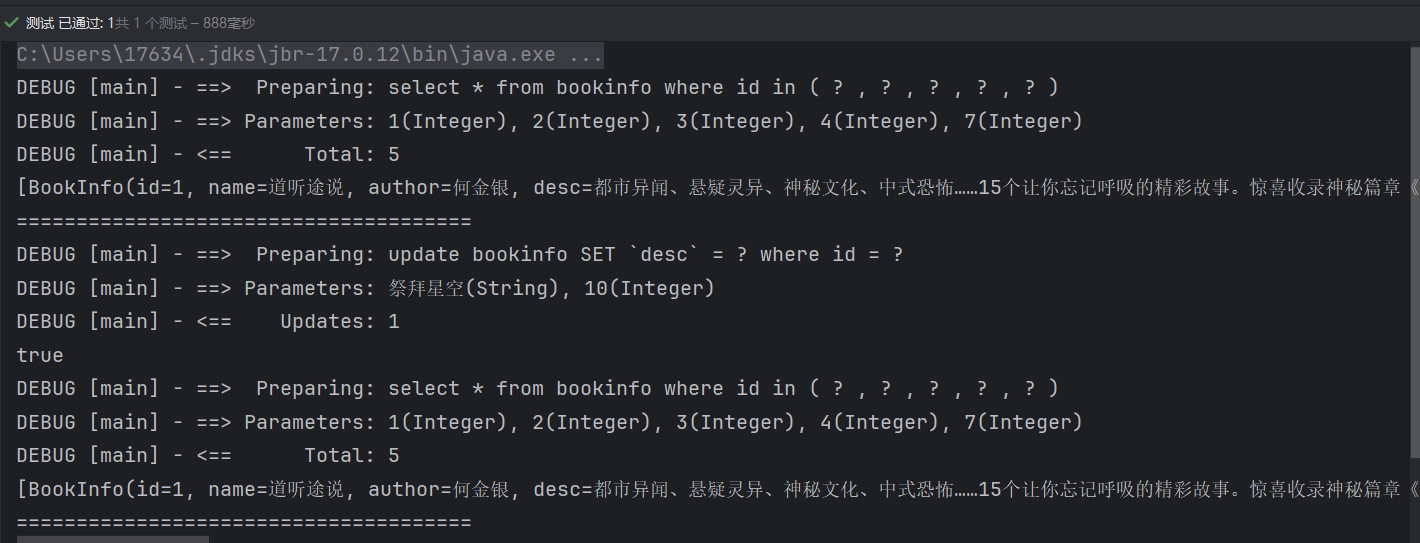
根据输出结果可以看到,第一次查询和第二次查询的sqlSession对象是同一个,sql语句,条件也相同,但是却执行了查询数据库的操作,这是因为我们在中间插入了修改的操作,缓存被清空,所以第二次查询才会去主动查询数据库,来避免脏读。
5.2 二级缓存
二级缓存,是
mapper级别的缓存,它是基于namespace级别的缓存,也就是说,不同的mapper的缓存是不共享的。二级缓存,比一级缓存sqlSession级别的范围更大,它可以跨越多个sqlSession,甚至是多个应用。并且默认是关闭的,开启需要手动进行配置。
- 在
mybatis-config.xml中配置开启缓存(默认是开启的,也可以不用去写)
<!-- ...省略其他代码 -->
<settings>
    <setting name="cacheEnabled" value="true"/>
</settings>
<!-- ...省略其他代码 -->
- 在映射文件
mapper.xml中配置开启缓存
<?xml version="1.0" encoding="UTF-8"?>
<!DOCTYPE mapper PUBLIC "-//mybatis.org//DTD Mapper 3.0//EN"
        "http://mybatis.org/dtd/mybatis-3-mapper.dtd">
<mapper namespace="org.example.mapper.BookInfoMapper">
    <!-- 开启二级缓存 -->
    <cache/>
<!-- ...省略其他代码... -->
</mapper>
基本上就是这样。这个简单语句的效果如下:
- 映射语句文件中的
所有 select 语句的结果将会被缓存。 - 映射语句文件中的
所有 insert、update 和 delete 语句会刷新缓存。 - 缓存会使用
最近最少使用算法(LRU, Least Recently Used)算法来清除不需要的缓存。 - 缓存
不会定时进行刷新(也就是说,没有刷新间隔)。 - 缓存会保存列表或对象(无论查询方法返回哪种)的 1024 个引用。
- 缓存会被视为
读/写缓存,这意味着获取到的对象并不是共享的,可以安全地被调用者修改,而不干扰其他调用者或线程所做的潜在修改。
5.2.1 使用二级缓存
直接编写测试类代码
    @Test
    public void testCacheTwo(){
        SqlSession session = null;
        SqlSession session1 = null;
        try {
            // 获取SqlSession对象
            session = MyBatisUtil.getSqlSession();
            session1 = MyBatisUtil.getSqlSession();
            BookInfoMapper mapper = session.getMapper(BookInfoMapper.class);
            BookInfoMapper mapper1 = session1.getMapper(BookInfoMapper.class);
            List<Integer> ids = new ArrayList<Integer>();
            Collections.addAll(ids,1,2,3,4,7);
//            命中缓存的前提,1). 同一sqlSession,2). 同一条件
            System.out.println(mapper.getBookInfoByIds(ids));
            System.out.println("======================================");
            System.out.println(mapper1.getBookInfoByIds(ids));
        } finally {
            // 关闭SqlSession对象,释放资源
            MyBatisUtil.closeSqlSession(session);
            MyBatisUtil.closeSqlSession(session1);
        }
    }
测试输出
org.apache.ibatis.cache.CacheException: Error serializing object.  Cause: java.io.NotSerializableException: org.example.model.BookInfo

	at org.apache.ibatis.cache.decorators.SerializedCache.serialize(SerializedCache.java:94)
.......
.......
.......
发现报错了,查看错误信息,java.io.NotSerializableException: org.example.model.BookInfo,BookInfo这个类没有序列化,不能进行缓存。
那也就是说,想要实现二级缓存,对应的实体类必须进行序列化,那在实体类中实现一下序列化
package org.example.model;

import lombok.Data;
import org.apache.ibatis.type.Alias;

import java.io.Serializable;

/**
 * 注解配置 别名为Book  对应的mapper文件中应该也使用Book
 *
 * @Alias("Book")
 * implements Serializable   实现序列化
 */
@Data
public class BookInfo implements Serializable {
    private Integer id;
    private String name;
    private String author;
    private String desc;
    private Double price;

}
实现了序列化后,再次运行
EBUG [main] - Cache Hit Ratio [org.example.mapper.BookInfoMapper]: 0.0
DEBUG [main] - ==>  Preparing: select * from bookinfo where id in ( ? , ? , ? , ? , ? )
DEBUG [main] - ==> Parameters: 1(Integer), 2(Integer), 3(Integer), 4(Integer), 7(Integer)
DEBUG [main] - <==      Total: 5
[BookInfo(id=1, name=道听途说,...), BookInfo(id=2, ...), BookInfo(id=3,...), BookInfo(id=4,...), BookInfo(id=7,...)]
======================================
DEBUG [main] - Cache Hit Ratio [org.example.mapper.BookInfoMapper]: 0.0
DEBUG [main] - ==>  Preparing: select * from bookinfo where id in ( ? , ? , ? , ? , ? )
DEBUG [main] - ==> Parameters: 1(Integer), 2(Integer), 3(Integer), 4(Integer), 7(Integer)
DEBUG [main] - <==      Total: 5
[BookInfo(id=1, name=道听途说,...), BookInfo(id=2, ...), BookInfo(id=3,...), BookInfo(id=4,...), BookInfo(id=7,...)]
我们发现,还是没有使用到二级缓存,上面说了,判断有没有使用缓存,看打印的SQL语句,这里打印了两次,说明我们并没有成功使用到二级缓存。
这个时候,就需要注意,关键的地方来了,虽然我们使用两个不同的sqlSession对象来测试二级缓存,但是结果放入缓存的前提是,sqlSession执行完成关闭后,才会放入,那接下来我们修改一下代码
    @Test
    public void testCacheTwo(){
        SqlSession session = null;
        SqlSession session1 = null;
        try {
            List<Integer> ids = new ArrayList<Integer>();
            Collections.addAll(ids,1,2,3,4,7);
            //获得会话1
            session = MyBatisUtil.getSqlSession();
            BookInfoMapper mapper = session.getMapper(BookInfoMapper.class);
            System.out.println(mapper.getBookInfoByIds(ids));
            // 关闭SqlSession对象,释放资源
            MyBatisUtil.closeSqlSession(session);

            System.out.println("======================================");
//            获得会话2
            session1 = MyBatisUtil.getSqlSession();
            BookInfoMapper mapper1 = session1.getMapper(BookInfoMapper.class);
            System.out.println(mapper1.getBookInfoByIds(ids));
        } finally {
            MyBatisUtil.closeSqlSession(session1);
        }
    }
测试输出
DEBUG [main] - Cache Hit Ratio [org.example.mapper.BookInfoMapper]: 0.0
DEBUG [main] - ==>  Preparing: select * from bookinfo where id in ( ? , ? , ? , ? , ? )
DEBUG [main] - ==> Parameters: 1(Integer), 2(Integer), 3(Integer), 4(Integer), 7(Integer)
DEBUG [main] - <==      Total: 5
[BookInfo(id=1, name=道听途说,...), BookInfo(id=2, ...), BookInfo(id=3,...), BookInfo(id=4,...), BookInfo(id=7,...)]
======================================
DEBUG [main] - Cache Hit Ratio [org.example.mapper.BookInfoMapper]: 0.5
[BookInfo(id=1, name=道听途说,...), BookInfo(id=2, ...), BookInfo(id=3,...), BookInfo(id=4,...), BookInfo(id=7,...)]
这次可以看到,第二次查询并没有再重新去访问数据库,而是直接从缓存中获取到了查询结果
tip: Cache Hit Ratio [org.example.mapper.BookInfoMapper]: 0.0 这个是指缓存的利用率,第一次查询缓存中没有结果,所以利用率是0,第二次查询缓存中有结果,所以利用率为1/2,也就是0.5。
总结一下使用二级缓存的要点:
- 对应的mapper.xml映射文件要设置
cache标签,开启二级缓存 - 实体类必须实现
Serializable接口,实现序列化 - 每次执行完sqlSession对象,必须要关闭流,才会将结果存入缓存中
5.2.2 清空缓存
二级缓存的清空同一级缓存一样,只要mapper发生了增删改操作,就会清空缓存,所以我们可以直接在测试类中进行测试
    @Test
    public void testCacheTwoClear(){
        SqlSession session = null;
        SqlSession session1 = null;
        try {
            List<Integer> ids = new ArrayList<Integer>();
            Collections.addAll(ids,1,2,3,4,7);
            //获得会话1
            session = MyBatisUtil.getSqlSession();
            BookInfoMapper mapper = session.getMapper(BookInfoMapper.class);
            System.out.println(mapper.getBookInfoByIds(ids));
            System.out.println("======================================");
//            执行修改数据的操作
            BookInfo bookInfo = new BookInfo();
            bookInfo.setId(1);
            bookInfo.setDesc("清空二级缓存测试");
            session.commit();
            System.out.println(mapper.updateBookInfo(bookInfo) > 0);
            // 关闭SqlSession对象,释放资源
            MyBatisUtil.closeSqlSession(session);
            System.out.println("======================================");
//            获得会话2
            session1 = MyBatisUtil.getSqlSession();
            BookInfoMapper mapper1 = session1.getMapper(BookInfoMapper.class);
            System.out.println(mapper1.getBookInfoByIds(ids));
        } finally {
            MyBatisUtil.closeSqlSession(session1);
        }
    }
测试输出
DEBUG [main] - Cache Hit Ratio [org.example.mapper.BookInfoMapper]: 0.0
DEBUG [main] - ==>  Preparing: select * from bookinfo where id in ( ? , ? , ? , ? , ? )
DEBUG [main] - ==> Parameters: 1(Integer), 2(Integer), 3(Integer), 4(Integer), 7(Integer)
DEBUG [main] - <==      Total: 5
[BookInfo(id=1, name=道听途说, author=何金银, 都市异闻、悬疑灵异、神秘文化、中式恐怖……15个让你忘记呼吸的精彩故事。惊喜收录神秘篇章《爱你,林西》。亲眼所见,未必真实。道听途说,未必虚假。, price=29.7),BookInfo(id=2, ...), BookInfo(id=3,...), BookInfo(id=4,...), BookInfo(id=7,...)]
======================================
DEBUG [main] - ==>  Preparing: update bookinfo SET `desc` = ? where id = ?
DEBUG [main] - ==> Parameters: 清空二级缓存测试(String), 1(Integer)
DEBUG [main] - <==    Updates: 1
true
======================================
DEBUG [main] - Cache Hit Ratio [org.example.mapper.BookInfoMapper]: 0.0
DEBUG [main] - ==>  Preparing: select * from bookinfo where id in ( ? , ? , ? , ? , ? )
DEBUG [main] - ==> Parameters: 1(Integer), 2(Integer), 3(Integer), 4(Integer), 7(Integer)
DEBUG [main] - <==      Total: 5
[BookInfo(id=1, name=道听途说, author=何金银, desc=清空二级缓存测试, price=29.7),BookInfo(id=2, ...), BookInfo(id=3,...), BookInfo(id=4,...), BookInfo(id=7,...)]
可以看到第一次查询过后,中间进行了修改操作,然后结束会话,这时候缓存就被清空了。第二次在执行相同的查询时候,缓存中并没有查找到,所以重新执行了查询语句。